
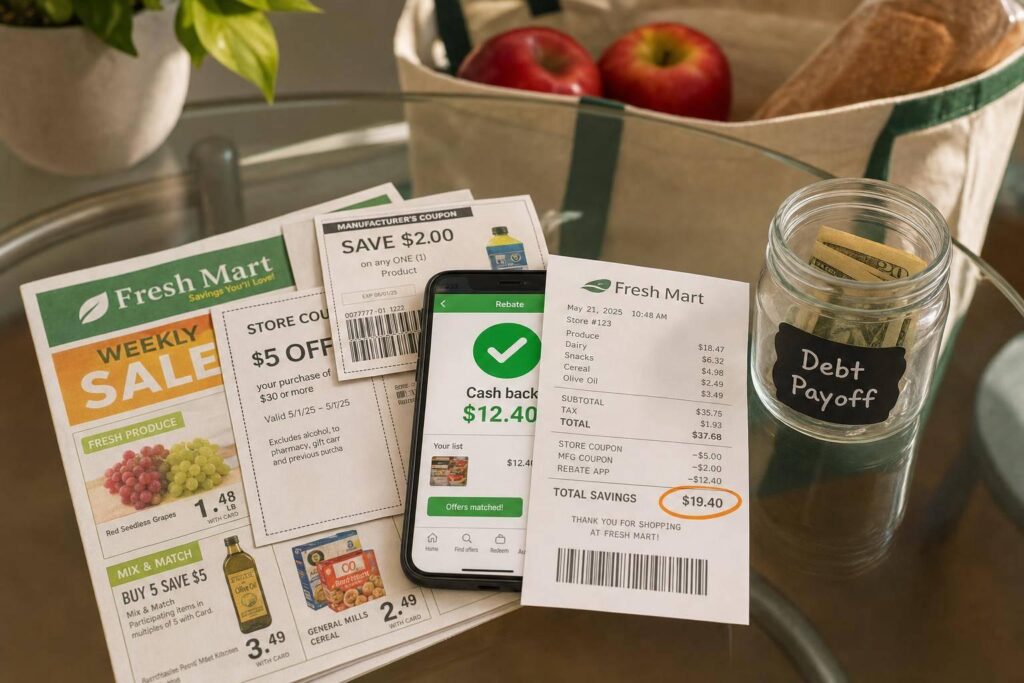
Coupon stacking can cut the price of one item from $5.00 to about $1.25 when you pair a sale, a store coupon, a manufacturer coupon, and a rebate app offer. If I want to spend less on groceries, the shortest path is simple: learn which discounts can work together, check the store’s rules, and only stack deals on items already on my list.
Here’s the whole article in plain English:
- I start with the sale price
- Then I add a store coupon
- Then I check for a manufacturer coupon
- After I buy, I submit the receipt to a cashback app
- I track the money I saved and move it to debt payoff or savings
The main thing I need to remember is this: not all coupons stack. One store coupon plus one manufacturer coupon often works on the same item, but two manufacturer coupons usually do not. And if an app coupon says Manufacturer, it can conflict with a paper manufacturer coupon.
A few points matter most:
- Store policy decides everything
- Digital offers must often be loaded before checkout
- Limits, exclusions, and expiration dates can stop a deal
- Cashback apps usually come after checkout, so they add one more layer
- Using coupons on unplanned items can wipe out the savings
If I’m new to this, I keep it small. I pick one store, one or two weekly items, and one rebate app. That’s enough to start saving $50 to $80 per month on groceries if I stay consistent and shop with a plan.
This guide walks through the rules, the order to stack discounts, the stores that tend to allow it, and the mistakes that can cost me money at the register.
★ What is Coupon Stacking?
sbb-itb-2a9374f
Coupon Stacking Rules at U.S. Stores
Whether a stack works or fails usually comes down to the store’s coupon policy.
In many cases, U.S. stores let you use one manufacturer coupon and one store coupon on the same item. Cashback apps work differently. They kick in after checkout, so they don’t count toward in-store coupon limits. That’s why the store policy comes first. It sets the rules for everything else in the stack.
One mistake trips up a lot of beginners: not every digital coupon is a store coupon. If a digital deal in a store app says "Manufacturer," it goes head-to-head with your paper manufacturer coupon. You can’t use both on the same item.
How to Read a Store Coupon Policy
Most major retailers post a coupon policy in the FAQ or customer service area of their website. Taking a minute to read it can save you an awkward checkout conversation.
Focus on a few things:
- Per-item coupon limits
- How the store labels digital offers
- Whether paper and digital versions of the same coupon can be used together
- Which items are excluded
Common exclusions at many stores include alcohol, tobacco, gift cards, and sometimes clearance items. Also keep an eye out for the phrase "Not valid with other offers." In plain English, that usually means no stacking.
One simple move can help a lot: screenshot the store’s official coupon policy and keep it on your phone. If a cashier questions your stack, you can pull up the policy and sort it out calmly on the spot.
Stores and Apps That Often Support Stacking
Once you know how to read the rules, the next step is figuring out where stacking is easiest. Here’s how major U.S. stores handle common stacking setups.
| Store | Manufacturer + Store Coupon | Digital Rules | Rewards Program | Typical Limit |
|---|---|---|---|---|
| Target | Yes | Circle offers stack with manufacturer coupons; can stack with price-matched items | Target Circle (5% with Card) | 4 identical coupons per day |
| CVS | Yes | App coupons stack with manufacturer coupons; spend-based offers can stack | ExtraCare (ExtraBucks) | ExtraBucks can roll to the next transaction |
| Walgreens | Yes | Digital and paper versions of the same coupon cannot be used on the same item | myWalgreens (Walgreens Cash) | One version of a coupon per item |
| Kroger | Yes | Weekly Digital Deals apply automatically; usable up to 5x per transaction | Kroger Plus (Fuel Points) | 5 uses per deal per transaction |
| Publix | Yes | Digital coupons must be loaded in the app before shopping | Club Publix | For BOGO items, one manufacturer coupon per transaction |
| Walmart | No | Accepts manufacturer coupons only; no traditional store coupons | Walmart Cash (Walmart+) | Coupon value is typically reduced to the item’s price |
| Kohl’s | Yes (online) | Up to 4 promo codes per online order | Kohl’s Cash / Rewards | One sitewide percentage-off code per order |
Grocery chains like Kroger and Publix tend to be easier for beginners because their systems often allow manufacturer coupons and store digital coupons to pair on eligible items. Walmart is a different story. Since it doesn’t offer old-school store coupons, your options are mostly limited to manufacturer coupons and Walmart Cash through Walmart+.
One more thing: load digital coupons before you shop. A lot of store systems won’t apply them if you clip them during checkout or after the transaction is done.
After you know which coupons can pair, the next step is building the stack at the shelf or register.
How to Build a Coupon Stack Step by Step
How to Stack Coupons: Step-by-Step Savings Guide
Once you know a store allows stacking, the next move is simple: build your savings in layers.
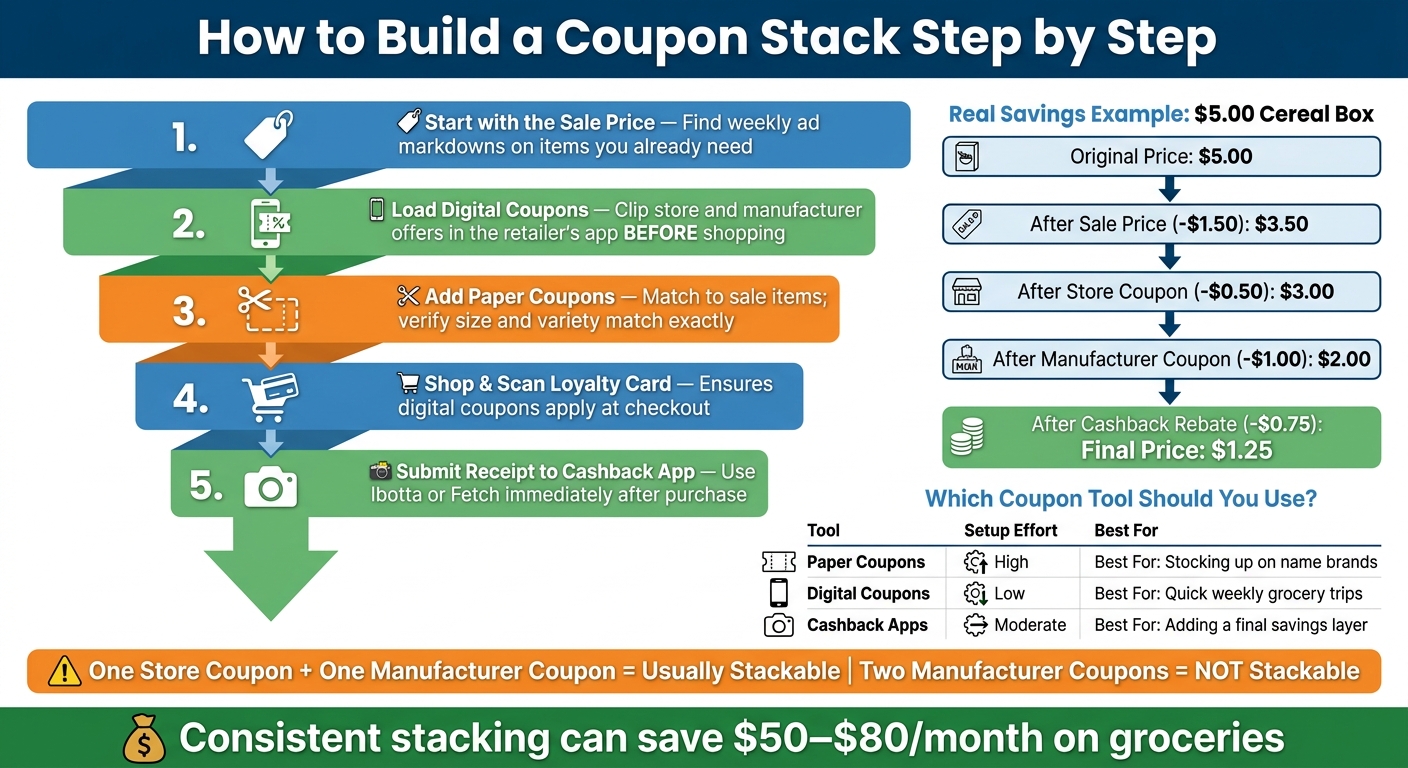
Start with the weekly store ad. That’s your base. Look for steep markdowns on items you already planned to buy. Those sale items are usually the best stacking targets because the price is already down before you add anything else.
A Simple In-Store Workflow for Groceries and Household Items
For most grocery and household runs, this order works well:
- Check the weekly ad – find sale items you need.
- Load digital coupons – clip store and manufacturer offers in the retailer’s app before you shop.
- Gather paper coupons – match them to the sale items, and make sure the size and variety line up exactly.
- Shop and scan your loyalty card – this helps the digital coupons apply at checkout.
- Submit your receipt – open Ibotta or Fetch right away and scan the receipt.
This can shrink prices fast. A $5.00 box of cereal, for example, can fall to $1.25 when you combine a $3.50 sale price, a $0.50 store coupon, a $1.00 manufacturer coupon, and a $0.75 rebate.
Online, Pickup, and Delivery Orders
Online stacking works a bit differently. The usual sequence is: deal source → promo code → checkout → reward step.
Activate your cashback portal before you open the retailer’s site or add anything to your cart. That part matters more than most people think. After that, apply your promo code at checkout and pay with a rewards credit card so you still earn points on the reduced total.
Many retail sites allow only one promo code per order. Even so, you can often build a three-part stack:
- one promo code
- a cashback portal
- a rewards card
Check the site’s terms before you assume an in-store stack will also work online.
Paper Coupons vs. Digital Coupons vs. Cashback Apps
Each option comes with its own trade-off. Some take more effort up front. Others are easier but may save a bit less. For beginners, it helps to see them side by side:
| Tool | Setup Effort | Ease of Use | Savings Potential | Best Use Case |
|---|---|---|---|---|
| Paper Coupons | High (Clipping/Filing) | Moderate | High (Stackable) | Stocking up on name-brand staples |
| Digital Coupons | Low (App download) | High (Auto-applies) | Moderate | Quick weekly grocery trips |
| Cashback Apps | Moderate (Scanning receipts) | Moderate | High (Post-purchase) | Adding a final layer to any purchase |
If you’re new to this, digital coupons are the easiest place to start. Once that feels easy, add a cashback app like Ibotta or Fetch as a second layer. Paper coupons make more sense when you’re stocking up on name brands and the coupon values are high enough to make the clipping worth your time.
Pick the method that fits your routine, and use it on items you were already going to buy.
Using Coupon Stacking to Lower Your Grocery Budget
Coupon stacking works best when it trims the cost of groceries you already planned to buy. Done right, it can cut grocery spending by $50 to $80 per month and free up cash for debt payoff.
Meal Planning Around Weekly Sales
After you understand how stacking works, use it to shape your grocery list around items that are already discounted. Check the weekly sales flyer or store app before you plan meals. Start with proteins and pantry staples, then build your list around those deals. Use coupons only for items that were already on your list.
The basic idea is simple: begin with the sale price, then add coupons and rewards on top. One stack can include:
- a sale price
- a store coupon
- a manufacturer coupon
- a rebate
That’s where the savings start to add up.
Tracking Savings and Putting the Money Toward Debt
The point isn’t just to walk out with a lower receipt. The point is to move that saved money into debt payments.
Track each shopping trip so the savings don’t just disappear into the rest of your budget. Write down the regular retail price, the final stacked price, and your total monthly savings every time you shop. Then send that amount to high-interest credit card debt.
If you want a simple way to sort those balances, use a debt review tool. Steps To Be Debt Free lets you review balances, payment status, and payoff priorities.
Common Coupon Stacking Mistakes Beginners Should Avoid
Once you know how coupon stacking works, the next move is simple: avoid the mistakes that wipe out your savings. Most beginner slip-ups happen when people skip the fine print.
Buying More Than You Need Because a Deal Looks Good
Only stack coupons on items that are already on your shopping list.
If you toss something into your cart just because there’s a coupon for it, you’re not saving money. You’re spending it. A deal can look great in the aisle and still hurt your budget at home.
Stick to your list, line it up with the weekly sale, and then add coupons on top. That’s where stacking starts to make sense.
The first mistake costs money. The second one can stop the whole stack at checkout.
Missing Limits, Exclusions, and Expiration Dates
This is the checkout problem people run into most often. Most stores let you use only one manufacturer coupon per item.
You also need to watch for phrases like "Not valid with other offers", sale exclusions, and buy-one-get-one rules. Those little details can shut the deal down fast.
Here’s what that can look like in practice:
- "Not valid with other offers" – a quick signal that the coupon can’t be stacked
- "Excludes items already on sale" – common on store coupons for clearance or weekly deals
- Buy-one-get-one rules – some stores block all coupons during BOGO events; others allow one coupon on the paid item only
Activate rebate offers before checkout, then submit your receipts right after shopping.
Conclusion: Start Small, Follow Store Rules, and Save Consistently
Coupon stacking works when you know the different coupon types, check each store’s policy before every trip, and apply discounts in the right order. When a store allows multiple layers, the price can drop fast. The best move is to keep it simple: focus on one store and a small set of items you buy again and again.
Pick one store with a clear coupon policy. Then stack deals on one or two staple items each week. That may sound small, but those weekly wins add up. Over time, they can trim your grocery bill and free up cash for other money goals.
Track your monthly savings and put that money to work. You might use it to pay down credit card balances or build your emergency fund. If you want a more guided way to put those savings toward debt, Steps To Be Debt Free can help you review balances and set payoff priorities.
Store policies can change, so check the current rules before you shop. Start small, follow the rules, and only stack when the deal matches your list.
FAQs
How do I know if a digital coupon is a store or manufacturer coupon?
Check the label in the retailer’s app. It will usually say Store Coupon or Manufacturer Coupon right at the top.
A Store Coupon usually shows the retailer’s logo and is paid for by the store. A Manufacturer Coupon comes from the brand and often includes reimbursement fine print.
Because those coupons come from two different sources, you can often stack one of each on the same item.
Can I stack coupons on BOGO deals?
Yes, you often can use coupons on BOGO deals because many stores treat BOGO promotions like sale prices. That means a manufacturer coupon or store coupon may still work on items already marked down.
That said, store rules differ. Some retailers let you stack coupons on BOGO offers, while others don’t allow it at all.
Before you shop, check:
- The store’s coupon policy
- The fine print on the coupon
A quick look can save you a headache at checkout.
What should I do if a valid coupon stack fails at checkout?
First, check the store’s coupon policy. Rules differ from one store to another, and they can change. Make sure your coupons haven’t expired, that you’re not trying to use two identical manufacturer coupons on the same item, and that your total discount doesn’t go over the item’s price.
If you’re shopping online, see whether the site lets you use only one promo code at checkout. If money is tight, Steps To Be Debt Free can help you stay organized while you fine-tune your savings plan.
